Don't backup [your config]
Apologies for the clickbaity title. I'll clarify what I mean momentarily
But first things first.
Absolutely do backup your data
Data is precious. Please take the time to ensure your precious photos, tax receipts, accounting and other important stuff is properly backuped. This is even the easiest of things to backup: a simple copy is enough.
For the more organized, you can follow the 3-2-1 backup principle, rsync to a local server or to the cloud, or deploy a Nextcloud instance etc... . But the beauty of data is: even if you can't rsync back because your restore script is outdated, or you have new data that you don't want to overwrite, or your Nextcloud fails for some reason, your saved data is still there. You may not be able to do that convenient one-click restore, but nothing is looking too dire. You can access the rsync location (with appropriate options for incremental backups), or you can browse the bind mount of your dead Nextcloud docker....
Data is easy to backup and to restore/retrieve

We've gone too far
Config is hard to backup
Most software we use isn't so easy to backup. Config files and bookmarks for browsers change locations with each version, DE and OS configuration files are often spread all over the place, from /etc/default/ to ~/.kde/share/config ... or was it ~/.config/kde/share ? Even customization-focused utilities like Neovim may depend on resources external to their clear config file/directory, such as a language server. Didn't document/automate its installation ? You're out of luck.
And did I forget to mention that some of these files change all the time ?
$ find ~/.config -mtime -1 -ls | wc -l
3025Config is hard to restore
It's not as simple as copy-pasting back your config files or directories anymore. Try doing that with your grub, fstab or another sensitive config file, and I guarantee you'll be disappointed (especially if you're changing hardware). Try doing that with a DE, and you may find there are hundred of files that should not stay unchanged while the DE goes up a minor version. The knowledge required to do that backup-and-restore process perfectly is essentially out of reach for us lowly humans.
Also, unlike 'raw' data such as images or PDFs, if your automated tooling breaks on you, there is usually no easy way to "read" things back into an usable state. I mean ,what are you gonna do: read that NoSQL database and apply the same settings via a GUI ? GLHF.
When the process might be this unreliable, it's understandable most people would be reluctant to test it on their shiny, beloved, newly-setup machine, but they might as well no do any backup at all at this point.
God bless the ones who don't test their backups, for many trials shall await them
The tooling is way too complicated
And buggy.

Special needs arise from backing up config. Version control, tooling to assist in save/restore, synchronization between different computers (that may share some software and configuration), but not all, heck some people even test their editor's config in a Github Action workflow. This is a prime example of over-engineering. And all this inherently has a way larger 'breakage surface' than copy-pasting PNGs on your external hard drive each month.
In my opinion, fully backing up and automating the process, keeping it up to date, and testing it... for all your configuration is an herculean effort that's most likely to go to waste.
The tooling, you'll say, is here to make our life easier. But in some kind of a boomerang effect, we're likely to actually spend more time mastering the new tool and going further than planned, wanted or needed. I personally use Ansible at work, and it makes sense (for managing our small cluster that has to test new versions of our products ~ monthly), but even then I'd see no practical use for it on my personal laptop.
And it takes too much damn time
Including the hypothetical time savings of the future reinstalls/restores.
Even (especially?) NixOS (which is kind of a culmination of config backup) users will have to agree, achieving the dream setup is hard. Especially the first time. Especially since the point is to not do it a second time.
Meanwhile the time you've saved not going crazy about your config's backup system can be spent (probably multiples times) redoing it* in case something breaks, and provided you've done the bare minimum (like having a README for the most difficult to install or esoteric things), re-setting up from scratch will be an order of magnitude faster than the first time, and another order of magnitude faster than achieving the perfect config backup.
To a NixOS'ed friend:
- "How much time did you spend making your 'perfect config' setup?" I asked
- "Way too much, tens of hours. But because I watched tons of videos, tested a lot of things and did these my way. Additionally, I split the work in two, first NixOS with 'regular' dotfiles, then home-manager. Also it's easier than ever since there is a graphical installer as of v22.05"
- "Bloated lol"
- "But don't worry I use the 'minimal' version without all this fluff. And, mark my words, [link to his dotfiles], the 1000th commit will be the last" (time will prove him wrong)
[EDIT: time did prove him wrong]
The 700-star, 8k-LoC, Rust project I've been developing for two years doesn't have 1000 commits. Project which, by the way, has had only 1 distro-specific issue out of roughly 150, which unsuprisingly, was about NixOS !! Talk about high-maintenance !
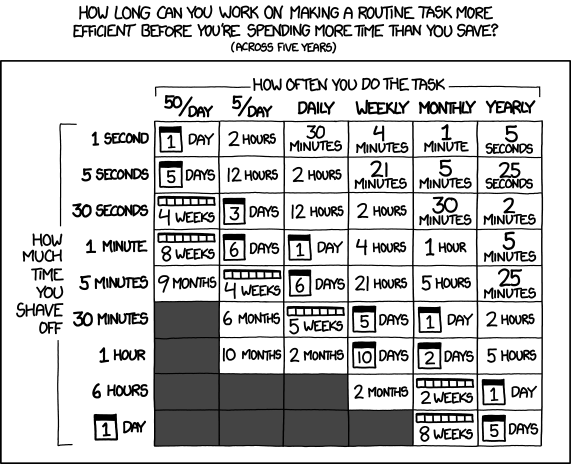
* I get than some people like to spend ages on their config and that's fine. The balance is different for the people who want fame and glory on r/unixporn. They have more to lose than the average Linux tinkerer.
If you have the time, and want to have fun and/or learn new stuff, going the long way for a 'perfect setup & backup' makes a lot more sense. Go for it!
People change, and so does configuration
Data is mostly static. You won't change on a weekly basis those birthday pictures or that tax receipt. But configuration changes over time. In fact, it must change to stay relevant.
Old software goes out of date, and possibly out of taste. New software appears and trends for a while, then its main developer gets hit by a bus.
Sometimes you have no choice
A rare case I hope, but less extreme examples may occur more often than you think.
Your note-taking application doesn't build anymore because it has a transversal dependency named leftpad. Or the v0.1.0 of some random music player you've loyally been using for ages (aka the new version breaks your custom theme) relies on versions of audio libraries so old they don't exist anymore, even in the deepest depths of Ubuntu's forums.
Of course, this is Linux, so you won't be forced to update... but you'd probably be better off not living too much in the past...
Sometimes you didn't know you wanted to change
So I've got this colleague at work, who uses a vim config that's almost older than me. He doesn't think it's any bad, but since auto-completion and intellisense weren't much of a thing back then, we're dealing with 3-letter variable names, and having to prefix the structs members by a shorthand for the struct name to match the 'codestyle' that was only created by the fact that full-text search was basically CLI grep 20 years ago. It's not my responsibility to get him to update, though I'm quite sure modern IDE features would, with all due respect, blow his mind.
By this contrived example, I wanted to express that maybe, to a lesser extent of course, the 'perfect config' you have may actually be preventing you from discovering new software, or configurations tips and tricks. And re-installing (from scratch) is a golden opportunity to do just that.
I consider my configuration power level to be around average, and for the year prior I've been using Garuda Linux (Arch before that btw) and KDE with only a random conky, latte-dock and some shortcuts for moving windows around. The reinstallation process to a 'working state' similar to prior took me about an hour or two (should I not want to simply restore a BTRFS snapshot), from booting the ISO to copying back my most important folders. I then took (chose to take) more time to improve things that frustrated me with my previous workflow, and ended up switching to Wayland and a "tiling manager" (inside KDE) named Bismuth, and both were nice upgrades I wouldn't think of living without now. Probably wouldn't have happened if I had a one-click button (that I spent days making) to restore all my config.
How do the others do ?
FreeBSD
There's tons of examples in the forums that explain how to fully backup your config. Good luck figuring which one is actually working, though.
Windows
By not allowing (extensive) customization, simply. Don't expect all your register edits to survive this evening's update by the way.
MacOS
Buy a new laptop, and then they'll allow you to change the wallpaper (maybe).
/s
Takeaways
- Backup your data consciously
- Manage the balance between the time you spend configuring your stuff, and the time it takes to adapt that into a fully backed up setup. How often does it happen to you to change computers or break your setup to the point you need that full restore, and fast ?
- Consider that potentially losing your configuration is a good thing that'll give you an opportunity to improve it, and that you'll finish the setup a lot quicker the next time anyway.
Thanks for reading,
Michael